
Learner Profiling Form Deped word format

The Complete Guide to DepEd Learner Profiling Form in Word Format
What is a Learner Profiling Form?
A learner profiling form is a comprehensive document used in Philippine K-12 schools to gather and organize critical information about individual students. Rather than just a basic enrollment sheet, a learner profiling form serves as a dynamic record that captures:
- Personal information (name, age, address, contact details)
- Family background (parents’ names, occupations, educational attainment)
- Learning characteristics (learning styles, strengths, challenges, interests)
- Socio-emotional factors (personality traits, emotional needs, social relationships)
- Academic performance (previous grades, subject strengths, areas needing support)
- Special considerations (special needs, health concerns, risk factors)
In the DepEd context, this form aligns with the K-12 Curriculum Framework’s commitment to personalized and differentiated learning, ensuring every learner receives appropriate support based on their unique profile.
The Modern Learner Profile: Beyond Basic Data Collection
Gone are the days when a learner profile simply collected names and addresses. Today’s DepEd learner profiling forms are dynamic tools that enable teachers to:
- Understand each student holistically
- Plan differentiated instruction effectively
- Identify learners at risk of dropout
- Support emotional and social development
- Communicate with parents and guardians meaningfully
- Adapt teaching strategies to learning preferences
Table of Contents
Why Learner Profiling Matters in the K-12 System
- Supports Personalized Learning
The DepEd’s K-12 Curriculum emphasizes that “no two learners are the same.” Learner profiling forms provide the foundation for implementing this principle. By understanding each student’s profile, teachers can tailor instruction to match learning styles, pace, and interests.
- Enables Early Identification of At-Risk Learners
Research shows that identifying vulnerable students early is crucial for intervention success. A comprehensive learner profile helps teachers spot:
- Learners with learning disabilities
- Students facing socio-economic challenges
- Those with attendance patterns indicating disengagement
- Learners with unmet emotional or psychological needs
- Improves Parent-Teacher Communication
When teachers reference specific information from learner profiles during parent-teacher conferences, communication becomes more targeted and meaningful. Parents appreciate when educators understand their child’s complete picture.
- Facilitates Collaborative Support
Guidance counselors, special education coordinators, and administrators can access learner profiles to provide coordinated support. This interdisciplinary approach is essential in the DepEd system.
- Documents Learning Progress
A well-maintained learner profile becomes a longitudinal record, showing growth over time. This is invaluable for:
- End-of-year assessments
- Grade transitions
- Identifying patterns in student development
Evidence-based instructional decisions
Essential Components of a DepEd Learner Profiling Form
A comprehensive DepEd learner profiling form in Word format should include:
Section 1: Learner’s Basic Information
Field | Purpose |
Full Name | Official identification |
Date of Birth / Age | Age-appropriate expectations |
Sex | Demographic tracking |
Contact Number | Emergency communication |
Email Address | Modern communication channel |
Home Address | Home visit coordination, emergency response |
Grade Level & Section | Academic placement |
Section 2: Family Background
Essential for understanding learner’s home environment:
- Parents’/Guardians’ names and occupations
- Family composition (number of siblings)
- Annual household income level
- Educational attainment of parents
- Primary language spoken at home
- Contact information for emergencies
Section 3: Medical & Health Information
Critical safety information:
- Height and weight
- Blood type
- Medical conditions or allergies
- Medication requirements
- Vision and hearing assessment results
- Vaccination status
- Physical disabilities or limitations
Section 4: Learning Profile
The core of modern learner profiling:
Learning Styles:
- Visual, Auditory, Kinesthetic preference
- Preferred learning environment (quiet vs. collaborative)
- Optimal time of day for learning
Strengths & Abilities:
- Academic strengths (subjects)
- Special talents or skills
- Positive behavioral characteristics
- Areas of confidence
Learning Challenges:
- Subject areas requiring support
- Learning disabilities (if identified)
- Attention or behavioral challenges
- Barriers to learning
Interests & Hobbies:
- Favorite subjects
- Extra-curricular interests
- Career aspirations
- Motivational factors
Section 5: Socio-Emotional Profile
- Personality traits
- Social relationships with peers
- Emotional regulation patterns
- Behavior in group settings
- Response to authority/structure
- Areas of emotional vulnerability
Section 6: Previous Academic Record
- Last year’s grades (if applicable)
- Previous school information
- Records of retention or acceleration
- Special education services received
- Attendance patterns
Section 7: Risk Factors & Special Considerations
- Identified risk factors (poverty, abuse, neglect)
- Psychosocial concerns
- Family stressors
- Mental health history
- Community risk factors
Section 8: Support Systems & Recommendations
- Current support mechanisms
- Previous interventions that worked
- Recommended accommodations
- Suggested teaching strategies
- Referral recommendations
Share to your friends!
Download here the Learner Profiling Form Deped word format!
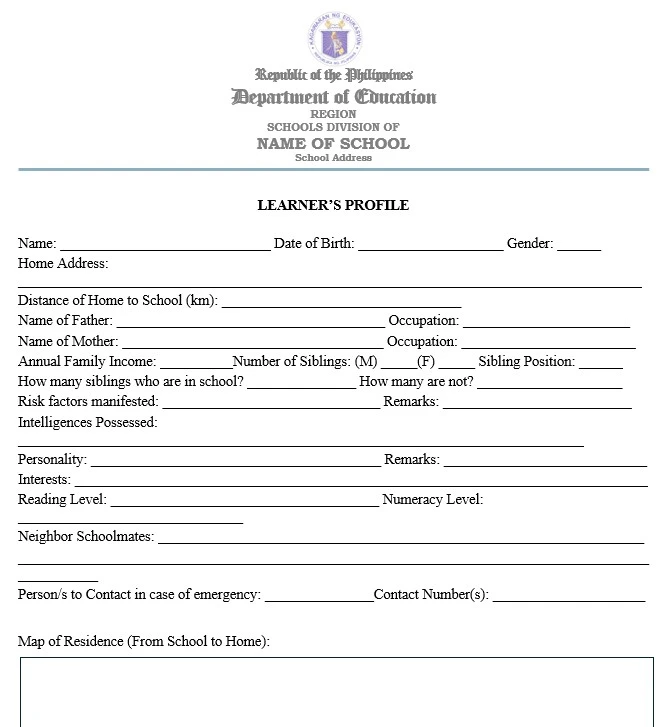
Learner Profiling Form Deped word format









Step-by-Step Guide to Creating a Learner Profiling Form in Word
Step 1: Open Microsoft Word and Set Up Your Document
- Open Microsoft Word
- Set up page margins: Go to Layout → Margins → Normal (1″ all sides)
- Choose orientation: Portrait is standard, but you may use Landscape for more columns
- Set font: Calibri or Arial, 11pt for body text
Recommended Settings:
– Font: Calibri, 11pt
– Line spacing: 1.15
– Alignment: Left-aligned body, centered headers
Step 2: Create the Header Section
[School Logo/Image] DEPED LEARNER PROFILING FORM [School Name]
School Year: _______________
- Font: Bold, 14pt for main title
- Alignment: Centered
- Add a horizontal line beneath for visual separation
Step 3: Organize Sections with Clear Headings
Use Heading 1 style for main sections (Format → Styles → Heading 1):
- LEARNER’S BASIC INFORMATION
- FAMILY BACKGROUND
III. MEDICAL & HEALTH INFORMATION
[etc.]
Step 4: Create Data Entry Fields
For each field, use this format:
Full Name: ________________________________ Sex: [ ] M [ ] F
Date of Birth: ______/_______/_______ Age: _______
Alternative approach (cleaner look):
Full Name: ____________________________________________
Age: ___________ Sex: [ ] Male [ ] Female
Step 5: Insert Tables for Organized Data
For sections requiring multiple related fields, use tables:
Right-click → Insert → Table
Recommended: 2 columns, variable rows
Column 1: Label (width 40%)
Column 2: Data entry space (width 60%)
Step 6: Add Checkboxes and Dropdown Lists
- For checkboxes: Insert → Shapes → Rectangle, or use [ ] symbols
- For Likert scales: Create a simple table for rating scales
Example – Learning Style Assessment:
Learning Style | Strong | Moderate | Weak |
Visual | ☐ | ☐ | ☐ |
Auditory | ☐ | ☐ | ☐ |
Kinesthetic | ☐ | ☐ | ☐ |
Step 7: Format for Easy Completion
- Use consistent spacing between sections (add 12pt space before/after)
- Highlight key sections with light background color (if printed will use light gray)
- Use borders to separate major sections
- Include instructions for difficult sections in italics
Step 8: Add Signature/Approval Section
At the bottom, include:
Prepared by: ________________________ Date: __________
(Class Adviser/Homeroom Teacher)
Reviewed by: __________________________ Date: __________
(School Guidance Counselor)
Approved by: ___________________________ Date: __________
(School Principal)
Step 9: Save Properly
- File name: Learner_Profiling_Form_SY2024-2025_[SchoolName]
- Format: Save as .docx (Word 2007+)
- Version control: Include school year in filename
- Location: Create a dedicated folder for DepEd forms
Step 10: Create a Fillable Version (Optional)
For digital distribution:
- Go to Developer tab (File → Options → Customize Ribbon → Check “Developer”)
- Select text field → Developer → Text Box (Legacy Tools)
- Add checkboxes and dropdowns as needed
- Protect form: File → Info → Protect Document → Restrict Editing
Disclaimer:
Some educational materials may be inspired by or aligned with DepEd curriculum standards.
However:
All materials uploaded or created are intended to support teachers and students.
If any copyrighted content is unintentionally shared, please contact us here depedlibre@gmail.com immediately for removal or proper attribution.
We respect intellectual property rights and respond promptly to valid copyright concerns.
Frequently Asked Questions
Q1: How often should learner profiles be updated?
A: Update profiles at minimum quarterly, but ideally after each grading period. For students with identified needs, updates should be more frequent (monthly or bi-weekly). Key events (standardized test results, behavioral incidents, new diagnoses) should trigger immediate updates.
Q2: Who is responsible for completing the learner profiling form?
A: Primarily the class adviser or homeroom teacher, with input from:
- Parents/guardians
- School guidance counselor
- Special education specialist (if applicable)
- Previous teacher (information transfer)
- The student themselves (self-assessment sections)
Q3: Should parents have access to the learner profile?
A: Yes, definitely! Parents should:
- Contribute information about their child
- Review the completed profile
- Receive a copy of appropriate sections
- Participate in interpretation and planning
However, some sections may be for professional use only (behavioral observations, staff notes).
Q4: How long should a learner profiling form be?
A: Aim for 3-5 pages for most students:
- Elementary: 2-3 pages
- Middle school: 3-4 pages
- High school: 4-5 pages
The length should be proportional to the time available. Better to have a concise, completed profile than an extensive, incomplete one.
Q5: Can we make the form fillable/digital?
A: Absolutely! To create a digital form:
- Open Word document
- Enable Developer tab (File → Options → Customize Ribbon)
- Insert form controls for text, checkboxes, dropdowns
- Protect the form (File → Protect Document)
- Share digitally or print as needed
This saves time and maintains consistency.
Q6: What if we don’t have complete information for a learner?
A: This is normal, especially at the start of the year. Begin with available information and make notes:
- “Information pending” for missing sections
- “Not assessed yet” for skills not yet observed
- Follow up within 2-3 weeks to complete the profile
Never delay profile creation waiting for perfect information.
Q7: How do we handle sensitive information in the profile?
A: Follow these guidelines:
- Store securely (locked drawer, password-protected file)
- Limit access (only teachers, counselors, admin with legitimate need)
- Use professional language for sensitive items
- Separate sections (keep behavioral concerns separate from academic profile)
- Follow DepEd protocols on data protection
Q8: Should learner profiles include special education information?
A: Yes, when applicable:
- Document identified disabilities
- Note accommodations/modifications needed
- Include previous evaluation results
- Reference IEP (Individualized Education Program) if applicable
- Coordinate with special education specialist
Q9: How do we make sure teachers actually use the profiles?
A: Institutionalize its use:
- Make completion mandatory (part of teacher responsibilities)
- Require documentation of profile use in lesson plans
- Reference profiles in school meetings
- Use profiles for data-informed decision making
- Train teachers on how to use profile information
- Model good practice as administrators
Q10: Can we share templates across our DepEd division?
A: Yes! This is encouraged:
- Standardized forms ensure consistency
- Saves teacher time
- Facilitates student transitions between schools
- Create division-wide templates
- Share through division office or teacher networks
Don’t forget to Follow our Facebook page for more free learning materials!
Latest News!
Download more files below!
- Adviser Files
- Aral Program Materials
- Brigada Eskwela Files
- COT Lesson Plans
- Daily Lesson Log (DLL)
- Deped Files
- Deped Modules
- Graduation Program/Files
- Homeroom Guidance Modules
- Matatag Curriculum Guide
- Matatag Lesson Exemplars
- National Learning Camp Files
- NAT Reviewer (New)
- Periodical Test (All Subjects)
- PowerPoint Game Templates
- Summative Tests/ Perfor Task
- Teacher Loans




Recent Posts
Download (by grade level)!
Grade 9 Files
Grade 10 Files
Grade 11 Files
Grade 12 Files