
Automated SF8 Free Download

What Is the DepEd SF8 (School Form 8)?
If you’re a class adviser or MAPEH teacher in any Philippine public school, the School Form 8 (SF8), officially titled the Learner’s Basic Health and Nutrition Report, is one of the most important compliance documents you’ll prepare every school year. But ask most teachers about it, and the first thing they’ll describe is the headache of manually computing dozens — sometimes hundreds — of BMI scores.
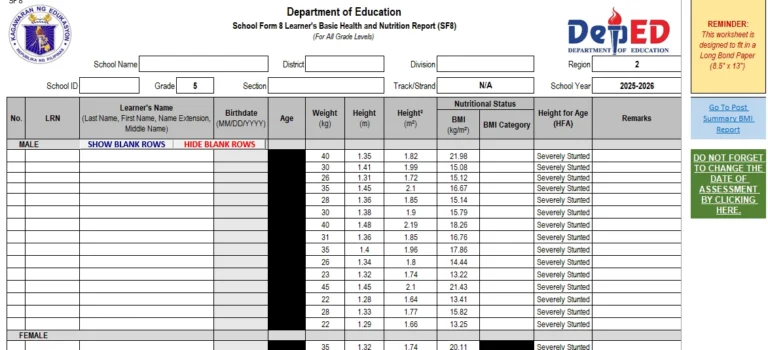
The SF8 is a DepEd-mandated form that records each learner’s weight, height, Body Mass Index (BMI), and nutritional classification. It must be accomplished twice a year: at the Beginning of School Year (BoSY) and the End of School Year (EoSY). It covers all grade levels, from Kindergarten to Grade 12 (Senior High School).
Official Purpose of the SF8
- Tracks learners’ physical and nutritional development throughout the school year
- Provides a long-term health profile that moves with the learner across grade levels
- Enables schools to identify malnourished students and enroll them in feeding programs
- Serves as the basis for DepEd’s national nutrition data and budget allocations
Replaces all previous nutritional status forms (under DepEd Order No. 13, s. 2017)
The form collects each learner’s name, sex, date of birth, age, weight (kg), and height (cm). From these inputs, the form computes the BMI and cross-references it against the WHO Child Growth Standards to assign a nutritional status category. Schools then use this aggregated data to plan health interventions, submit to the Division Office, and report to the National Nutrition Council.
“Timely health data collection is the first line of defense against chronic child malnutrition. Without accurate SF8 records, intervention programs lose their targeting precision.”
— Paraphrased from National Nutrition Council Philippines guidelines
Why You Need the Automated SF8 Version (Not the Blank Template)
Here’s the honest truth: the basic blank SF8 that DepEd distributes is technically sufficient for compliance — but it puts all the computational burden on you. For a class of 45 students, computing BMI manually, then looking up each child’s age-adjusted z-score on a separate WHO chart, then classifying them, then tallying the summary table by sex and category… that’s not a 30-minute task. Teachers routinely spend an entire afternoon or evening on a single SF8 submission.
The Automated SF8 solves this completely. It’s a specially formatted Excel (.xlsx) file where you only enter the raw data — name, sex, birthdate, height, and weight — and every other calculation happens automatically. BMI is computed. The nutritional status category is assigned. The summary table fills itself. You’re done.
Manual / Blank SF8 | Automated SF8 (Excel) |
BMI must be computed by hand for each learner | BMI auto-calculated from weight and height inputs |
Requires separate WHO z-score lookup tables | WHO growth standards embedded in the file |
Summary tables must be tallied manually | Summary tables populate automatically |
High risk of arithmetic and transcription errors | Formulas prevent manual calculation errors |
Takes 2-4 hours per class section | Takes 15-30 minutes per class section |
Corrections require re-doing entire rows | Update one cell — all dependent fields refresh |
Beyond time savings, accuracy matters enormously here. The SF8 doesn’t just affect a teacher’s workload — it affects whether a malnourished child gets enrolled in a school feeding program or slips through the cracks. Automation reduces the human error that puts real learners at risk.
Key Features of the Automated SF8 Excel Template
Not all ‘automated’ SF8 files floating around the internet are created equal. The version available through the official DepEd LIS portal — widely enhanced by the teaching community — includes the following features:
- Enter weight and height once. BMI calculates instantly using the standard formula: weight (kg) divided by height (m) squared.Auto-BMI Computation —
- Embedded z-score reference tables for BMI-for-Age and Height-for-Age, covering ages 5-19 for both sexes.WHO Growth Standards —
- Automatically assigns Severely Wasted, Wasted, Normal, Overweight, Obese, Stunted, Tall, and more.Auto-Classification —
- Printable DepEd-format summary organized by sex and nutritional status category — auto-populated.Summary Tables —
- Separate tabbed sheets for beginning-of-year and end-of-year measurements within a single workbook.BoSY & EoSY Sheets —
- Pre-configured print areas and page layouts for direct A4 printing with correct DepEd form headers.Print-Ready Format —
Understanding BMI & Nutritional Status Categories in the SF8
One of the most confusing parts of the SF8 for new teachers is understanding the different classification systems used. The form uses two separate metrics: BMI-for-Age (for weight status) and Height-for-Age (for growth/stature status). Here’s a complete breakdown:
BMI-for-Age Classifications (Weight Status)
Classification | BMI / Z-Score | What It Means | Urgency |
Severely Wasted | Below -3 SD | Acute severe malnutrition; critical underweight | CRITICAL |
Wasted | -3 SD to below -2 SD | Moderately underweight for height; at-risk | AT RISK |
Normal | -2 SD to +1 SD | Healthy weight range for age and sex | HEALTHY |
Overweight | +1 SD to +2 SD | Above healthy range; monitor for obesity risk | MONITOR |
Obese | Above +2 SD | Significantly above healthy range; intervene | INTERVENE |
Height-for-Age Classifications (Growth Status)
Classification | Z-Score | What It Means |
Stunted | Below -2 SD | Chronic malnutrition; long-term growth delay |
Normal | -2 SD to +3 SD | Height is within healthy range for age |
Tall | Above +3 SD | Height exceeds the 99.9th percentile |
Share to your friends!




Step-by-Step: How to Use the Automated SF8 Template
Using the automated SF8 is genuinely straightforward — even if you’re not a spreadsheet expert. Here’s exactly what to do from the moment you open the file:
- Click the download link. Open the .xlsx file in Microsoft Excel (recommended) or Google Sheets. Enable editing and macros if prompted — these are necessary for the formulas to work.Download and open the Excel file —
- In the header area, enter your School Name, School ID, Division, District, Grade Level, Section, School Year, and your name as Class Adviser or MAPEH Teacher.Fill in school and class information —
- For each learner, input: (1) Learner Reference Number (LRN), (2) Full Name, (3) Sex (M/F), (4) Date of Birth, (5) Weight in kilograms, and (6) Height in centimeters. Do not modify the formula columns.Enter each learner’s basic data —
- As soon as you enter weight and height, the Age (in months), BMI, BMI-for-Age classification, and Height-for-Age classification columns fill in automatically.Watch the BMI and classifications populate automatically —
- Scroll to the summary section. You’ll find a pre-filled count of learners per nutritional category, broken down by sex — exactly the format your school head needs.Review the auto-generated summary table —
- Use File > Print (Ctrl+P) and select the pre-defined print area. The form prints to standard A4 paper in official DepEd SF8 format, ready for signing and submission.Print or export the completed SF8 —
- Switch to the EoSY sheet. Enter the new measurements taken at year-end for easy comparison and year-end progress reporting.Repeat for End-of-School-Year (EoSY) using the second tab —
Disclaimer:
Some educational materials may be inspired by or aligned with DepEd curriculum standards.
However:
All materials uploaded or created are intended to support teachers and students.
If any copyrighted content is unintentionally shared, please contact us immediately for removal or proper attribution.
We respect intellectual property rights and respond promptly to valid copyright concerns.
Legal Basis: DepEd Orders That Govern SF8 Submission
The SF8 isn’t optional — it carries full legal weight under several DepEd issuances. Here are the key references every teacher should know:
- Establishes the School Forms (SF1-SF10) system, mandating SF8 as the official replacement for all previous nutritional status forms. Requires BoSY and EoSY completion by all class advisers and MAPEH teachers.DepEd Order No. 13, s. 2017 —
- The School-Based Feeding Program guidelines that use SF8 data as the primary basis for targeting beneficiaries.DepEd Order No. 16, s. 2012 —
- Underscores the government’s legal obligation to track child nutrition, with DepEd as a key implementing agency through school-based monitoring tools like the SF8.Republic Act No. 11148 (Kalusugan at Nutrisyon ng Mag-Nanay Act) —
Non-submission or inaccurate submission of the SF8 can affect a school’s compliance rating and potentially delay the release of health program funds. Always keep your accomplished SF8 on file.
Frequently Asked Questions About the Automated SF8
Q: Is the automated SF8 officially recognized by DepEd?
Yes — provided the output matches the official SF8 format. DepEd’s own LIS portal provides an official Excel version with embedded formulas. As long as the printed output matches the required format, it is accepted.
Q: Can I use this in Google Sheets instead of Microsoft Excel?
Most basic formulas work in Google Sheets, but some complex array formulas and VLOOKUP functions may not translate perfectly. For best compatibility, use Microsoft Excel (even the free online version at office.com).
Q: My class has learners from Kindergarten — is there a separate template?
The comprehensive automated SF8 template typically handles all grade levels using different reference sheets for different age ranges. Some teachers prefer separate templates for Kinder (ages 5-6) because WHO growth standard tables differ. Check if the version has a Grade Level selector or separate tabs.
Q: What if a learner’s BMI falls exactly on the boundary between two categories?
The WHO z-score tables use strict greater-than/less-than thresholds. If a learner lands exactly on a boundary, the formula classifies them in the lower category (e.g., -2.00 SD = Normal, not Wasted). Consult your school nurse for a clinical judgment if needed.
Q: I have a learner with a disability who couldn’t be measured standing. How do I handle this?
DepEd recommends consulting with the school nurse or a physician for alternative measurement techniques (e.g., arm span or knee-to-heel measurements). Note the measurement methodology in the remarks column. Don’t leave the row blank.
Q: Is this template updated for SY 2025-2026?
Yes. The template available through the official DepEd LIS portal reflects the current SF8 format and WHO growth standards applicable for SY 2025-2026. School year fields are editable for future years without needing a new template.
- Adviser Files
- Aral Program Materials
- Brigada Eskwela Files
- COT Lesson Plans
- Daily Lesson Log (DLL)
- Deped Files
- Deped Modules
- Graduation Program/Files
- Homeroom Guidance Modules
- Matatag Curriculum Guide
- Matatag Lesson Exemplars
- National Learning Camp Files
- NAT Reviewer (New)
- Periodical Test (All Subjects)
- PowerPoint Game Templates
- Summative Tests/ Perfor Task
- Teacher Loans