
Kindergarten Graduation Program Template
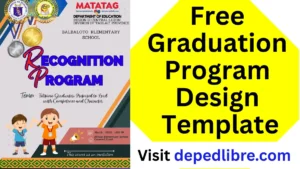
Picture this: Twenty-two tiny graduates shuffle across a gymnasium stage in miniature caps and gowns. One trips on her oversized robe. Another waves wildly at his grandma. A third freezes under the spotlight, then breaks into the biggest grin you’ve ever seen. Their families laugh, cry, and snap a thousand photos — and every single one of those parents is clutching a little folded booklet in their hands.
That booklet — the graduation program — is doing a lot of quiet, important work. It tells parents when to applaud. It gives grandparents the children’s names so they can whisper, ‘That’s the one!’ It lists the songs, the speakers, and the order of events so that a roomful of excited, emotional people can move through the ceremony as one. And when the day is over, it becomes a keepsake tucked into baby books and refrigerator drawers for years to come.
A well-designed kindergarten graduation program template is not a luxury — it’s the backbone of a smooth, memorable celebration. This guide gives you everything you need: the what, the why, the how, and a free downloadable template you can customize right now.
What Is a Kindergarten Graduation Program? (And Why It Matters More Than You Think)
The Program as a Roadmap
At its most functional level, a kindergarten graduation program is a printed guide to the ceremony’s order of events. It tells attendees what’s happening, when, and in what sequence — from the processional music to the final recessional. Think of it like a playbill at a theater: without it, the audience is watching action without context.
But here’s what most program templates miss: the kindergarten graduation program is also a storytelling document. It captures, in a few beautifully designed pages, the arc of an entire school year — the first anxious September mornings, the friendships forged over finger paint, the triumphant moment a child first recognizes their own name in print.
The Emotional Value for Families
Parents of kindergarteners are not a tough crowd to move. They will cry at the recessional, guaranteed. But the program amplifies that emotion in meaningful ways:
- It makes the ceremony feel official and important — which communicates to children that their achievement is real and valued.
- It gives families a tangible memory to take home — something physical in an era of digital-everything.
- It helps grandparents, aunts, uncles, and family friends feel connected to the event, even if they don’t know most of the children by name.
- It serves as a beautiful, low-cost keepsake that families preserve for years.
“The program is often the only physical memento families take home from kindergarten graduation. Make it worth keeping.” |
The Practical Value for Teachers
From a logistics standpoint, the program serves teachers and organizers just as much as families:
- It establishes the official running order so everyone — teachers, students, AV staff, principals — is on the same page.
- It acts as a rehearsal guide: students know when to sing, stand, and receive their diplomas.
- It reduces questions from parents (“When do kids get their diplomas? Can I come to the stage?”).
- It documents the ceremony for school archives and future planning.
Anatomy of a Perfect Kindergarten Graduation Program Template
Not all program templates are created equal. The best ones share a consistent structure that balances completeness with readability. Here’s a breakdown of every section your template should include — and what to put in each one.
1. Front Cover
The cover is your first impression. It sets the visual tone for the entire ceremony and should immediately communicate warmth, celebration, and pride. Essential elements include:
Cover Element | What to Include | Design Tips |
Event Title | “Kindergarten Graduation Ceremony” or “Kindergarten Moving-Up Ceremony” | Use a large, festive font — at least 28pt |
School Name | Full official name of the school | Bold it; families love seeing the school name honored |
Date & Year | Month Day, Year (e.g., June 6, 2025) | Include the year — it matters for keepsake purposes |
Tagline or Quote | Optional: an inspirational quote or class motto | “The future belongs to those who believe…” works beautifully |
Decorative Elements | Graduation caps, stars, pencils, rainbows, flowers | Use bright, child-friendly colors or a consistent theme |
2. Welcome Message
This is a brief, warm greeting — typically from the principal or lead teacher. It should be 3–5 sentences maximum. The goal is to set an emotionally inclusive tone that welcomes families and acknowledges the children’s achievement.
Sample Welcome Message: “Welcome, families and friends! Today we gather to celebrate one of life’s most magical milestones — the end of kindergarten. These incredible children have grown in ways that would fill every notebook in the classroom. We are so proud, and so honored to share this day with you.” |
3. Order of Events / Program of Ceremony
This is the most-read section of the entire program. List every element of the ceremony in order, with clear titles. A typical kindergarten graduation ceremony runs 30–60 minutes and includes:
- Processional (students enter to music)
- Welcome Remarks (principal or teacher)
- Pledge of Allegiance
- Opening Song (performed by the class)
- Poems or Recitations
- Slideshow or Photo Montage
- Recognition of Students / Diploma Presentation
- Class Song or Medley
- Closing Remarks / Words of Encouragement
- Recessional (students exit to music)
Pro Tip: Next to each event, note the approximate duration in parentheses — e.g., “Diploma Presentation (approx. 15 min.)” — so families with restless younger siblings can plan accordingly.
4. Class Roster
List every graduating child’s full name — alphabetical by last name is the most common approach. For kindergarten, consider also adding a small detail next to each name, such as:
- Their “when I grow up” career aspiration (adorably collected via a class survey)
- A favorite book or character from the year
- A one-word description submitted by their parent
This personalizes the program enormously and gives families something to chuckle about for years.
5. Song Lyrics
If the class will perform a song during the ceremony, include the lyrics in the program. This lets families sing along and adds an interactive, emotional element to the ceremony. Choose songs that are:
- Age-appropriate and easy to memorize
- Thematically relevant (growing up, friendship, the future)
- Short enough to hold five-year-olds’ attention (2–3 minutes max)
6. Acknowledgements & Thank-Yous
Dedicate a short section to thanking the people who made the year possible: classroom volunteers, PTA/PTO members, room parents, specialist teachers, custodial and administrative staff. Don’t overlook the “invisible” contributors — the people who set up the chairs, printed the diplomas, and arranged the flowers.
7. Back Cover
The back cover is a frequently wasted opportunity. Options that families love:
- A class group photo
- A “Class of [Year]” message with a fun fact (“This class read 1,847 books together!”)
- A space for autographs from classmates and teachers
- A note from the graduating class written collaboratively
Choosing the Right Format: Size, Fold, and Layout
Before you open any design tool, make a few key formatting decisions. These choices affect how much content fits, how the program is printed, and how it looks in a parent’s hands.
Format | Dimensions | Best For | Pages Available |
Half-fold (most common) | 8.5″ x 11″ folded to 5.5″ x 8.5″ | Classes of 15–30 students | 4 pages (front, 2 inside, back) |
Tri-fold | 8.5″ x 11″ folded in thirds | Shorter ceremonies, elegant look | 6 panels |
Booklet (stapled) | Multiple 8.5″ x 11″ pages | Larger classes, more content | 8+ pages |
Single sheet | 5″ x 7″ or 4″ x 6″ card | Very brief ceremonies | 2 sides |
Our recommendation: The half-fold (standard letter paper folded in half) is the sweet spot for most kindergarten graduations. It’s inexpensive, universally printable, and provides exactly enough space for all the essential sections without feeling overwhelming.
Design Principles for a Memorable Program
You don’t need to be a graphic designer to create something beautiful. But understanding a few core design principles will help you avoid the most common mistakes.
Color Palette
Choose 2–3 colors and use them consistently throughout the program. Great options for kindergarten graduations:
Theme | Primary Color | Accent Color | Mood |
Classic | Navy Blue | Gold | Traditional, elegant |
Spring Garden | Mint Green | Soft Coral | Fresh, joyful |
Rainbow | Purple | Yellow | Playful, vibrant |
Modern | Charcoal | Teal | Clean, contemporary |
Pastel | Lavender | Peach | Soft, dreamy |
Typography (Fonts)
Use a maximum of two fonts — one for headings, one for body text. Avoid using more than two, which creates visual clutter. Great pairing ideas:
- Heading: Lato Bold | Body: Lato Regular (clean, modern, universally readable)
- Heading: Playfair Display | Body: Source Sans Pro (elegant, classic)
- Heading: Nunito Bold | Body: Open Sans (friendly, approachable)
Font size guide: Title: 24–28pt | Headings: 16–18pt | Body: 11–12pt | Footer: 9pt. Never go below 10pt for body text — many attendees are grandparents.
White Space
Resist the urge to fill every inch of the program. White space is not wasted space — it’s breathing room. A program that’s crowded and dense feels stressful. A program with generous margins and spacing between sections feels calm, polished, and intentional.
Imagery and Clip Art
Keep illustrations relevant and consistent in style. Mixing clip art styles (cartoon + realistic, for example) looks amateur. Choose one style and stick with it. Kindergarten-appropriate imagery includes:
- Graduation caps and diplomas
- Stars, rockets, and “reach for the sky” motifs
- Books, pencils, apples
- Rainbows, suns, and flowers
- Children’s silhouettes in caps and gowns
Share to your friends!


The Best Tools for Creating Your Program (Free & Paid)
The good news: you have excellent free options that produce professional-quality results. Here’s an honest comparison:
Tool | Cost | Ease of Use | Best Feature | Best For |
Microsoft Word | Free (school license) / ~$10/mo | ⭐⭐⭐⭐⭐ | Familiar interface, great templates | Teachers comfortable with Office |
Google Docs | Free | ⭐⭐⭐⭐⭐ | Easy sharing and collaboration | Teams working together |
Canva (free tier) | Free | ⭐⭐⭐⭐⭐ | Beautiful drag-and-drop design | Visual, design-forward programs |
Canva Pro | $15/month | ⭐⭐⭐⭐⭐ | More templates, brand kit | Schools doing multiple events |
Adobe Express | Free / $10/mo | ⭐⭐⭐⭐ | Professional quality | Design-confident users |
Microsoft Publisher | Included with Office 365 | ⭐⭐⭐⭐ | Page layout control | Multi-page booklets |
Step-by-Step: How to Customize Your Free Template
Now that you’ve chosen your tool, let’s build the program. This walkthrough applies whether you’re using our free downloadable template or starting from one of the platform templates above.
Step 1: Gather Your Information First (30 Minutes Before You Design)
Opening a design tool without your content ready is the most common time-wasting mistake. Before you open anything, collect:
- Full, correctly spelled names of every graduating student
- Names and titles of all speakers (Principal [Name], Teacher [Name], etc.)
- Exact running order of the ceremony
- Song titles and lyrics (if including)
- School name, address, and date/time
- Names of everyone you want to thank in the acknowledgements
- Any quotes, mottos, or class-specific details
Step 2: Choose or Set Up Your Template
Open the free template at the bottom of this article (or download it from our link). The template is set up as a half-fold letter format with all sections pre-labeled. Replace the placeholder text with your information.
If using Canva or another tool, search “kindergarten graduation program” in the templates section. Filter by “free” if you’re on the free plan.
Step 3: Customize the Cover
Update the cover with: the ceremony title, your school name, the date, and any class-specific imagery or theme. This is where you can have the most fun — match your graduation decor, school colors, or a theme the class loved throughout the year (Dr. Seuss, jungle animals, space, etc.).
Step 4: Fill in the Order of Events
List every element of the ceremony in order. Be specific but concise: “Welcome Remarks — Mrs. Johnson, Principal” reads much better than just “Welcome.”
Step 5: Add the Class Roster
Type every student’s name carefully. Triple-check spelling against your class list. Consider alphabetizing by first name for a kindergarten program — it’s more natural for children to find themselves this way, and you can ask students during rehearsal to point to their name!
Step 6: Proofread Three Times
Student names are sacred. A misspelled name is the one thing a family will notice and remember. Use spell-check, then read the names aloud one by one, then have a second person review the final version.
Step 7: Do a Test Print
Before printing 30 copies, print one. Check:
- Does the layout look as intended when folded?
- Are the margins correct — no text cut off?
- Are images clear and not pixelated?
- Is the font legible at printed size?
- Are colors accurate?
Step 8: Print & Assemble
For most half-fold programs, print double-sided, then fold. If printing at home, use cardstock (65 lb or heavier) for a more premium feel. Many teachers send programs to a local copy shop for professional finishing — it typically costs under $0.30 per program and makes a huge difference in quality.
Final Thoughts: Make It Personal, Make It Beautiful
Here’s the truth about kindergarten graduation programs: the families who receive them will not care whether you used Canva or Microsoft Word, whether the margins are exactly 1 inch, or whether your font pairing is technically perfect. What they will care about — what they will remember — is whether the program captured something true about their child and their year.
Did it have their child’s name, spelled correctly, in a list alongside their classmates? Did it capture the name of the song their daughter practiced every night for two weeks? Did it include the little detail — the “wants to be an astronaut” or the “favorite book was Dragons Love Tacos” — that made them laugh and cry at the same time?
That’s what a great kindergarten graduation program template does. It holds the moment. It gives families something to hold onto when the day moves too fast, when the ceremony is over in a blur of applause and happy tears, when the little graduate is asking for snacks before the recessional music has even stopped.
Use this guide, download your free template, and make something worth keeping. Your students — and their families — deserve it.
🎓 Congratulations on planning a ceremony that these families will talk about for years. You’ve got this, and your little graduates are so lucky to have you. |
Disclaimer:
Some educational materials may be inspired by or aligned with DepEd curriculum standards.
However:
All materials uploaded or created are intended to support teachers and students.
If any copyrighted content is unintentionally shared, please contact us immediately for removal or proper attribution.
We respect intellectual property rights and respond promptly to valid copyright concerns.
- Adviser Files
- Aral Program Materials
- Brigada Eskwela Files
- COT Lesson Plans
- Daily Lesson Log (DLL)
- Deped Files
- Deped Modules
- Graduation Program/Files
- Homeroom Guidance Modules
- Matatag Curriculum Guide
- Matatag Lesson Exemplars
- National Learning Camp Files
- NAT Reviewer (New)
- Periodical Test (All Subjects)
- PowerPoint Game Templates
- Summative Tests/ Perfor Task
- Teacher Loans